
Most businesses struggle with rankings even when their content is solid. The issue often comes down to visibility. A page can be well-written, optimized, and live on your site, yet it gets little to no traffic. In many cases, it is not connected to anything else. No internal links are pointing to it, no clear path for users to reach it, and no strong signals telling search engines like Google that it matters. This is what an orphan page looks like, and it is one of the most common reasons good content gets overlooked.
An orphan page does not look like a problem at first. It loads properly, and in some cases, it may even be indexed. The issue shows up in its performance. Because it is not connected to the rest of your site, users cannot reach it through menus or internal links. Search engines like Google also have no clear signals to understand their importance, so the page often gets treated as low priority.
For businesses investing in SEO, this leads to wasted effort. You are creating content that never gets seen, ranked, or converted. In fact, studies show that over 90 percent of web pages get no organic traffic from Google. Poor internal linking and disconnected content are often a key reason behind that.
Key Takeaways
- Orphan pages are URLs with no internal links, which makes them difficult for users and search engines to discover
- Search engines like Google rely on internal links to understand page importance and structure
- These pages weaken your SEO by blocking authority flow and reducing crawl efficiency
- Fixing orphan pages improves both search visibility and user navigation across your site
- Preventing them requires a consistent internal linking process, not just occasional audits
What Is an Orphan Page and Why Does It Matter
An orphan page is any page on your website that does not receive a single internal link from another page on the same site. It may still exist in your content management system or appear in your XML sitemap, but without links, it remains isolated.
This isolation creates both technical and strategic problems. From a technical perspective, search engines rely on links to crawl and evaluate content. From a strategic perspective, internal links help distribute authority and guide users toward conversions.
The difference becomes easier to see when you compare a connected page with an orphan page. Looking at them side by side makes the gap in performance and visibility much clearer.
| Factor | Connected Page | Orphan Page |
| Internal links | Multiple links from relevant pages | No incoming links |
| Crawlability | Easily discovered | Often missed or delayed |
| Authority | Gains and passes value | Receives none |
| User access | Found through navigation | Requires a direct URL |
| Ranking ability | Strong potential | Very limited |
When a page is disconnected, it loses both visibility and purpose. Even strong content becomes ineffective if it is not part of your site’s structure.
How Orphan Pages Are Created in Real Scenarios
Orphan pages usually aren’t created on purpose. They tend to show up as a site grows and content gets added without a clear linking process in place. A common example is during a redesign or migration. Pages get moved, URLs change, and in the process, some internal links don’t get updated. The pages are still live, but they quietly lose their connections to the rest of the site.
Another frequent cause is publishing new content without linking it from existing pages. A blog post may go live, but if it is not referenced elsewhere on the site, it becomes isolated from day one.
Landing pages used for paid campaigns are also a major source of orphan pages. These pages are often built quickly for ads and then forgotten once the campaign ends. Without integration into the main site, they never contribute to organic growth.
Content updates can also create this issue. When older pages are replaced or rewritten, internal links may be removed instead of updated. Over time, this leaves certain pages without any connections.
In larger teams, the problem often comes down to process. Without a clear checklist for internal linking before publishing, it becomes easy for pages to slip through without proper integration.
Why Orphan Pages Hurt SEO Performance
Orphan pages create a gap between your content and your results. You may have pages that are well-written and relevant to your audience, but without internal links, they lack the support system needed to perform in search. For businesses investing in SEO, this often means lost visibility, fewer leads, and content that never reaches its full potential. The issue is not what the page says, but how it fits into the larger structure of your website. Search engines like Google rely on clear connections between pages to understand importance, relevance, and hierarchy. When those connections are missing, performance drops.
Search Engines Cannot Properly Discover Them
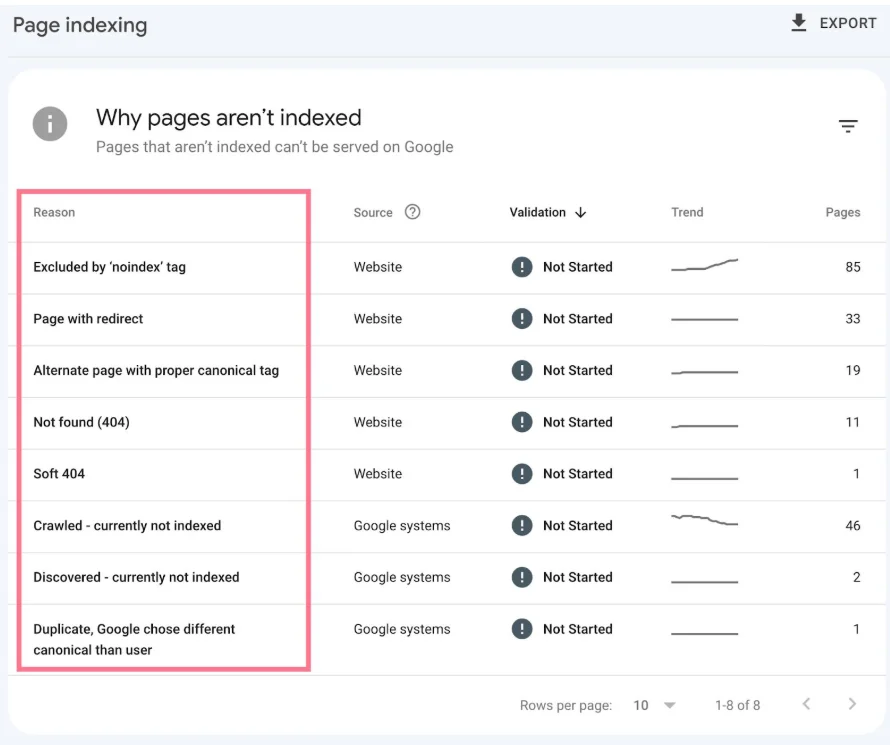
Google Search Console indexing report highlighting how some pages are discovered and indexed while others remain unlinked and harder to surface in search results
Search engines such as Google use internal links as their primary method of discovering new content. When a page has no links pointing to it, there is no clear path for crawlers to follow.
Even if the page is listed in a sitemap, links carry more weight. Without them, the page may be crawled less frequently or ignored entirely. This limits its chances of appearing in search results.
Indexing Becomes Inconsistent
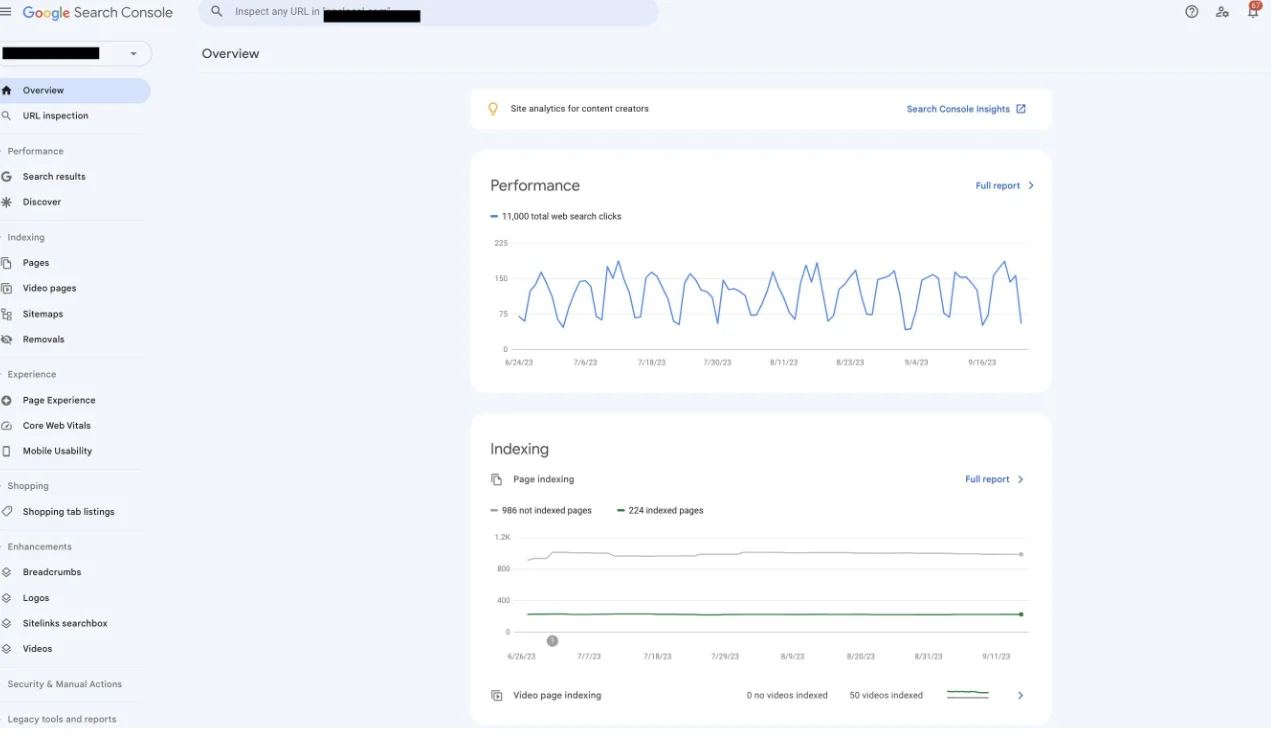
Google Search Console performance report showing how page visibility can fluctuate when content is not consistently supported by internal links or a strong site structure
A page without internal links sends weak signals about its importance. This often leads to inconsistent indexing behavior.
Some orphan pages never get indexed at all, while others may appear temporarily and then disappear from search results. This creates confusion, especially when content appears to be published correctly but fails to perform.
Authority Does Not Flow Across the Site
Internal linking is one of the main ways authority moves through a website. When pages link to each other, they share value and strengthen the overall domain.
Orphan pages break this flow. They do not receive authority from other pages, and they cannot pass value forward, which is especially important in competitive industries like home remodeling SEO, where a strong internal structure directly impacts visibility and lead generation.
Crawl Budget Is Used Inefficiently
Search engines allocate a limited amount of resources to crawl each site. This is known as the crawl budget. When your site structure is not clear, crawlers may spend more time trying to discover disconnected pages instead of focusing on important ones. This leads to slower indexing and delays in updating content in search results.
| Crawl Scenario | Result |
| Clear internal links | Efficient crawling |
| Disconnected pages | Wasted crawl effort |
| Strong structure | Faster indexing |
| Weak structure | Delayed visibility |
User Experience Is Negatively Affected
A page that cannot be reached through navigation is effectively invisible to users. Even if it contains valuable information, visitors will not find it unless they have the direct link.
This reduces engagement and can lead to missed conversions. A strong website guides users naturally from one page to another, helping them find what they need without effort. Orphan pages disrupt that experience.
Understanding Crawl Depth and Its Connection to Orphan Pages
Crawl depth refers to how many clicks it takes to reach a page from the homepage. It is a simple but powerful way to evaluate accessibility.
| Crawl Depth | Impact on SEO |
| 1–2 clicks | High visibility |
| 3 clicks | Moderate visibility |
| 4+ clicks | Low visibility |
| No path | Orphan page |
Orphan pages fall outside this structure entirely. They are not just deep in the site. They are disconnected from it. Keeping important pages within a few clicks of the homepage improves both user experience and search performance.
How Google Evaluates Orphan Pages
There is a common belief that including a page in your XML sitemap is enough to ensure it performs well. In reality, internal linking plays a much larger role. Search engines rely on links to understand how pages relate to each other and which ones deserve attention. A page without internal links often looks less important, even if the content itself is strong. Over time, this affects how often it is crawled, how it is indexed, and whether it has a real chance to rank.
Search engines evaluate pages based on multiple signals:
| Signal | Role in Ranking |
| Internal links | Define structure and importance |
| Content quality | Determines relevance |
| Backlinks | Provide external authority |
| Sitemap | Supports discovery |
Without internal links, a page is often treated as low priority. It may still be indexed, but it is unlikely to rank well for competitive queries. In most cases, it will struggle to gain visibility beyond very low-volume searches. Over time, it can lose traction completely as other, better-connected pages take its place.
How to Find Orphan Pages on Your Website
Identifying orphan pages requires comparing what exists on your site with what is actually connected. Start by exporting indexed URLs from Google Search Console. This gives you a list of pages that search engines are aware of.
Next, crawl your website using a tool such as Screaming Frog SEO Spider. This shows which pages can be discovered through internal links. When you compare these two lists, any page that appears in the index but not in the crawl is likely an orphan.
You can then use Google Analytics to review how these pages perform. Pages with little or no engagement are strong candidates for improvement or removal.
How to Fix Orphan Pages Effectively
The solution depends on the value of the page. If the page is important, the best approach is to add relevant internal links from other pages. These links should feel natural and provide context rather than being forced.
For high-value pages, adding them to navigation menus or category pages can improve visibility further. If a page has limited value, it may be better to merge it with a stronger page. This consolidates authority and avoids unnecessary duplication. In cases where the page no longer serves a purpose, removing it and adding a proper redirect helps maintain a clean structure, and this is where a clear approach to content pruning becomes important for keeping your site focused and effective.
| Action | When to Use It |
| Add internal links | Valuable content |
| Add to navigation | High-priority pages |
| Merge content | Thin or overlapping pages |
| Remove and redirect | Outdated or irrelevant pages |
How to Prevent Orphan Pages Going Forward
Preventing orphan pages requires a simple but consistent process. Before publishing any new page, make sure it is linked from at least two or three relevant pages. At the same time, include outbound links to related content so it becomes part of a broader topic.
After major updates such as redesigns or migrations, always review your internal links. This helps catch issues early before they affect performance.
Regular audits also play an important role. Monthly checks can help identify new orphan pages and fix them quickly before they impact rankings.
| Task | Frequency |
| Internal link check | Before publishing |
| Site crawl | Monthly |
| Full audit | Quarterly |
| Post-update review | After major changes |
Orphan Pages SEO FAQs
What is an orphan page in SEO?
An orphan page is a page on your website that has no internal links pointing to it. It may still exist on your site and can even be indexed by search engines like Google, but it is disconnected from the rest of your structure. Without links, it becomes harder for both users and search engines to find and understand its importance.
Are orphan pages bad for SEO?
Yes, orphan pages are bad for SEO because they break the flow of internal linking that search engines rely on to understand site structure. When a page is not connected, it often gets less visibility and weaker ranking potential. Over time, this can lead to wasted content that never performs.
How do I find orphan pages on my website?
You can identify orphan pages by comparing indexed URLs in Google Search Console with a full site crawl from tools like Screaming Frog SEO Spider. Any page that appears in Search Console but not in your crawl is likely an orphan page. This helps you quickly spot disconnected content.
How do I fix orphan pages?
The best way to fix orphan pages is by adding relevant internal links from related pages so they become part of your site structure again. For important pages, you can also include them in navigation or category hubs to improve visibility. If the page has little value, merging or redirecting it may be a better option.
How can I prevent orphan pages in the future?
Preventing orphan pages requires a consistent internal linking process every time new content is published. Each page should be linked from at least a few relevant existing pages, so it is never left isolated. Regular site audits also help catch issues early before they affect SEO performance.
Fix the Pages You Already Have Before Creating More
Orphan pages are easy to miss because nothing looks broken. Your site loads fine, pages are live, and everything feels normal, but some pages sit there with no internal links, which means no traffic, no rankings, and very little visibility. SEO is not just about publishing content; it is about making sure every page is connected so search engines like Google can actually find it and understand where it fits. Before creating more content, it is worth checking what you already have because fixing orphan pages and adding internal links can bring those forgotten pages back into search and help them start performing again.
As a digital marketing partner, ITVibes helps businesses strengthen their SEO foundation by focusing on structure, not just content. Our team works on internal linking strategies, technical audits, and content optimization so every page on your website has a purpose and contributes to growth. We make sure your content is not just published, but connected in a way that supports rankings and leads.
Ready to fix the gaps holding your website back? Contact us today to improve your internal linking, clean up orphan pages, and build an SEO strategy that helps every page on your site work harder for your business.